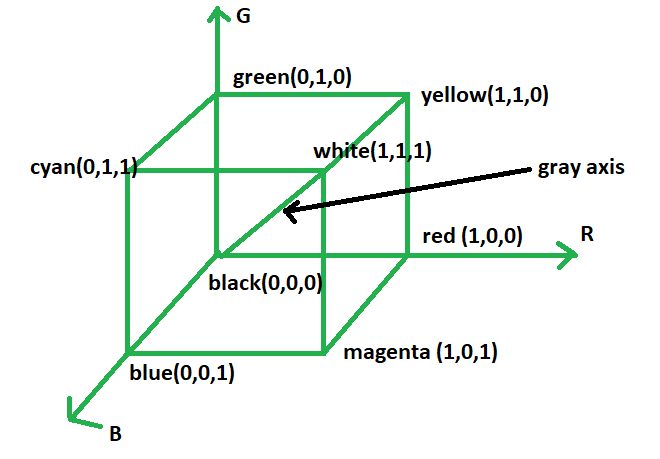
How Digital Color Works
reflected color (ink or physical color forms) and projected color (color on a computer or a phone screen)
Reflected Color (Ink)
- How It Works: Created when light hits an object (like ink on paper) and certain wavelengths are absorbed while others are reflected. The color we see is the result of the wavelengths that are reflected back to our eyes.
- Color Mixing: mixing colors typically follows the subtractive color model (like CMYK used in printing). For example, mixing cyan and yellow ink creates green because the combination absorbs certain wavelengths and reflects others.
Projected Color (Screens)
- How It Works: Projected color is generated through emitted light. Screens (like those on computers or phones) emit light in various colors directly to our eyes. Each pixel can emit red, green, and blue light at different intensities.
- Color Mixing: Projected colors use the additive color model (RGB). When red, green, and blue light mix, they create a wide range of colors. For instance, combining red and green light produces yellow
How Is Color Represented in Digital Image
24-Bit Color
Definition: 24-bit color, represents colors using three color channels: red, green, and blue (RGB).
Each channel is typically allocated 8 bits, allowing for 256 intensity levels per channel.
Structure:
- Each pixel = three bytes (24 bits in total): one byte for red, one for green, and one for blue.
- This allows for over 16 million possible colors (256 x 256 x 256).
Example:
- A standard JPEG or PNG image typically uses 24-bit color.
- For instance, a pixel with RGB values of (255, 0, 0) would represent bright red, (0, 255, 0) would represent bright green, and (0, 0, 255) would represent bright blue
Summary
- Indexed Color: Efficient for images with limited colors, using a palette (e.g., GIF).
- 24-Bit Color: Offers a broader spectrum of colors suitable for detailed images (e.g., JPEG, PNG).